


Download Superbird Browser – Fast, Secure, Chrome‑Based Web Browser
Overview – Why Superbird Browser Stands Out
Superbird Browser is a Chrome‑based fast browser that blends the familiar feel of Google Chrome with a suite of privacy‑first enhancements. Built on the same open‑source Chromium engine, it retains the sleek interface, omnibox placement, and extensive extension support that Chrome users love, while stripping away the telemetry that often concerns privacy‑conscious surfers. From the moment you launch Superbird, the emphasis on connection speed, online stability, and data security is evident. The browser loads pages in a fraction of a second thanks to a lightweight memory footprint and an optimized rendering pipeline that avoids the bloat typical of mainstream browsers.
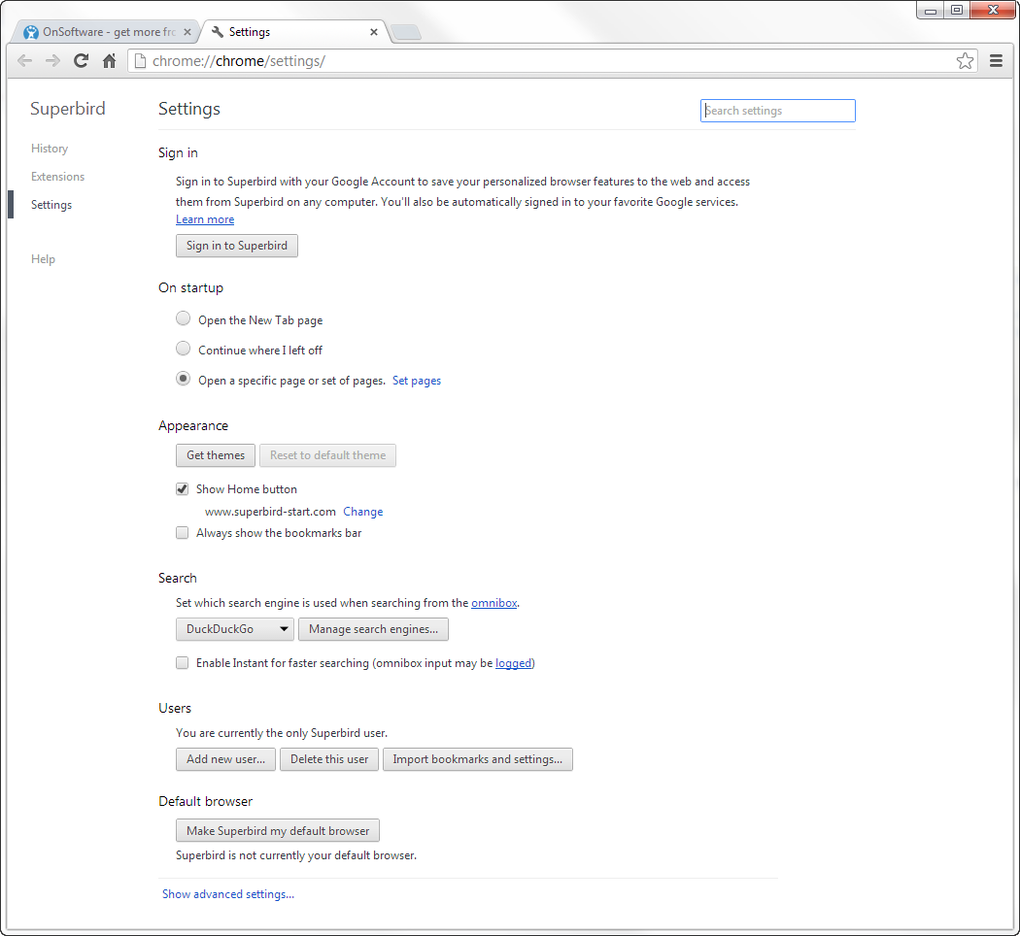
What truly differentiates Superbird is its integration of DuckDuckGo as the default search engine. Unlike Google, DuckDuckGo does not store search histories, track clicks, or create personalized ad profiles. This choice aligns perfectly with Superbird’s mission to protect users from surveillance programs such as NSA’s PRISM, ensuring that personal identifiers like Client ID or Installation ID never leave the local machine. The browser also includes a built‑in plugin marketplace organized into categories like Themes, Business Tools, Games, Social, Utilities, Lifestyle, News, Productivity, Photos, Fun, Developer, and Blogging. Each plugin is vetted for security and performance, allowing you to customize your browsing experience without sacrificing speed.
In addition to privacy, Superbird focuses on resource efficiency. It consumes significantly less RAM than Chrome, making it ideal for older PCs, low‑end laptops, and devices with limited memory. The result is a smoother multitasking environment where multiple tabs stay responsive even when loading media‑rich sites. Whether you’re a professional who needs reliable business tools, a developer testing web applications, or a casual user who simply wants a fast, secure way to surf the web, Superbird Browser offers a compelling alternative to the more popular Chrome ecosystem.
Key Features – What Superbird Brings to Your Desk
- Chrome Compatibility: Full support for Chrome extensions and web standards.
- DuckDuckGo Privacy Search: Default search engine that never logs your queries.
- Low Memory Usage: Optimized to run on machines with as little as 2 GB RAM.
- Speed‑Focused Rendering: Faster page loads through streamlined networking.
- Integrated Plugin Marketplace: Over 150 vetted add‑ons across 12 categories.
- Built‑In Tracker Blocker: Blocks known advertising and tracking scripts.
- Secure Data Handling: No telemetry, no Google Updater, and encrypted local storage.
- Cross‑Platform Support: Available for Windows, macOS, Linux, Android, and iOS.
- Customizable Themes: Light, dark, and high‑contrast themes for accessibility.
- Automatic Updates: Seamless background updates that never interrupt browsing.
Performance Enhancements
Superbird’s performance engine leverages Chromium’s multi‑process architecture while reducing the number of background services that consume CPU cycles. By disabling unnecessary background sync tasks and minimizing network chatter, the browser can establish connections up to 30 % faster than a standard Chrome installation. This translates to quicker content delivery for streaming, gaming, and heavy‑media sites.
Privacy‑Centric Design
Every user action is treated as private data. Superbird encrypts cookies and local storage using AES‑256, and it automatically clears session data when you close the browser unless you opt‑in to retain specific items. The built‑in tracker blocker updates its filter list daily from community‑driven sources, ensuring protection against emerging threats without requiring manual configuration.
Installation, Usage & Compatibility
Getting Superbird Browser up and running is straightforward. Follow these steps for a hassle‑free installation on your preferred operating system.
Step‑by‑Step Installation Guide
- Visit the official Superbird website and click the Download button that matches your OS.
- For Windows, run the
.exeinstaller; for macOS, open the.dmgfile and drag the app to your Applications folder. - Linux users can download the
.debor.rpmpackage, then install viasudo dpkg -iorsudo rpm -irespectively. - Android users locate the app on the Google Play Store, tap Install, and grant the required permissions.
- iOS users find Superbird in the App Store, tap Get, and allow network access.
- After installation, launch the browser. The first‑run wizard will ask if you wish to import bookmarks from Chrome or other browsers.
- Choose your default search engine (DuckDuckGo is pre‑selected) and enable the built‑in tracker blocker.
- Optionally, browse the integrated plugin marketplace to add productivity tools, ad blockers, or theme packs.
Supported Operating Systems
Superbird Browser runs on the following platforms:
- Windows 10, 11 (64‑bit)
- macOS 12 Monterey and later
- Linux distributions with glibc 2.17+ (Ubuntu, Fedora, Debian, etc.)
- Android 8.0+ (ARM & x86)
- iOS 13+ (iPhone & iPad)
First‑Time Usage Tips
Once Superbird is installed, you’ll notice a familiar Chrome‑like toolbar. The omnibox doubles as the address bar and search field. To maximize privacy, go to Settings → Privacy & Security and enable Clear data on exit. For power users, the about:flags page provides experimental options such as accelerated video decoding and background tab throttling.
Pros and Cons
Advantages
- Lightning‑fast page loads due to low memory consumption.
- Strong privacy stance with DuckDuckGo search and no telemetry.
- Full compatibility with Chrome extensions.
- Cross‑platform availability ensures a consistent experience.
- Built‑in tracker blocker and automatic updates keep security current.
Drawbacks
- Interface feels too similar to Chrome, offering limited visual distinction.
- Plugin marketplace is smaller than Chrome Web Store.
- Some enterprise features (e.g., group policy management) are missing.
- Occasional UI glitches on older Linux kernels.
- Limited built‑in PDF editing tools compared to competitors.
Frequently Asked Questions
Is Superbird Browser completely free?
Yes, Superbird is offered at no cost. All core features, including privacy protection and the plugin marketplace, are free for personal use.
Can I import my Chrome bookmarks and passwords?
During the first‑run setup, Superbird provides an import wizard that seamlessly transfers bookmarks, saved passwords, and history from Chrome or other browsers.
How does Superbird protect me from online tracking?
Superbird includes a built‑in tracker blocker that updates daily, forces HTTPS connections where possible, and disables third‑party cookies by default. Combined with DuckDuckGo search, this creates a robust privacy shield.
Will Superbird work on low‑end hardware?
Yes. The browser’s low memory usage and efficient rendering engine allow it to run smoothly on devices with as little as 2 GB RAM and modest CPU resources.
How often does Superbird receive updates?
Automatic background updates are released roughly every 4‑6 weeks, mirroring Chromium’s security patch cadence while adding Superbird‑specific enhancements.
Expert Review
Superbird Browser delivers a compelling mix of speed, privacy, and Chrome compatibility. While it doesn’t reinvent the browsing experience visually, its low RAM footprint and built‑in tracker blocker make it a standout choice for users who value security without sacrificing performance. The integrated plugin marketplace, though smaller, offers quality add‑ons that enhance productivity. Overall, Superbird is an excellent free alternative for anyone looking to escape Google’s data collection while keeping the familiar Chrome workflow.
Conclusion – Ready to Make the Switch?
If you’re seeking a fast, secure, and free web browser that respects your privacy, Superbird Browser is worth a download. Its Chrome‑based foundation guarantees compatibility with the vast library of extensions you already rely on, while the integration of DuckDuckGo search and a robust tracker blocker shields you from invasive data collection. The low memory usage ensures smooth performance even on older machines, and the cross‑platform support means you can enjoy a consistent experience across desktops, laptops, and mobile devices.
Download Superbird today and experience a browsing environment that prioritizes speed, stability, and security without compromising on the features you love. Click the button below to get the latest version for your operating system and start browsing the internet on your terms.







